Due to a new documentation requirement for a technical process at work, I recently needed to generate a custom Microsoft Endpoint Configuration Manager (MEMCM, formerly known as SCCM) report for all of the detected software product codes on a given site server.
What is a product code?
According to Microsoft’s documentation for Windows Installer:
[su_quote]The product code is a GUID that is the principal identification of an application or product…. If significant changes are made to a product then the product code should also be changed to reflect this. It is not however a requirement that the product code be changed if the changes to the product are relatively minor.[/su_quote]

I use product codes to assist with software asset tracking and generation of software installation reports for the enterprise ConfigMgr environment. Of course, you can accomplish the same goal using Add/Remove Programs display names and/or asset intelligence normalized publisher, product, and version values, but in some cases it is easier to define some criteria using the product code (especially if you already have a list of product codes available).
Where are product codes stored in the Config Manager SQL databases?
You can query product information from Add/Remove Programs using two separate views, one for 32-bit products and one for 64-bit products. These views surface data from Config Manager’s hardware inventory schema:
- v_GS_ADD_REMOVE_PROGRAMS
- v_GS_ADD_REMOVE_PROGRAMS_64
I also reference the following asset intelligence view, that uses the same hardware inventory data:
- v_GS_INSTALLED_SOFTWARE
Report Query
Here is my report query that performs a select from views v_GS_ADD_REMOVE_PROGRAMS, v_GS_ADD_REMOVE_PROGRAMS_64, and v_GS_INSTALLED_SOFTWARE.
DECLARE @productCode nvarchar(50) = '{00000000-0000-0000-0000-000000000000}';

select arp32.Publisher0, arp32.DisplayName0, arp32.Version0, arp32.ProdID0
from dbo.v_GS_ADD_REMOVE_PROGRAMS arp32 WITH (NOLOCK)
where (ProdID0 like @productCode OR @productCode IS NULL)
and ( Publisher0 is not null
and DisplayName0 is not null
and Version0 is not null )
and ProdID0 IS NOT NULL
and ProdID0 <> ''
and ProdID0 <> 'none'
group by Publisher0, DisplayName0, Version0, ProdID0
union (
select arp64.Publisher0, arp64.DisplayName0, arp64.Version0, arp64.ProdID0
from dbo.v_GS_ADD_REMOVE_PROGRAMS_64 arp64 WITH NOLOCK)
where (ProdID0 like @productCode OR @productCode IS NULL)
and ( Publisher0 is not null and DisplayName0 is not null
and Version0 is not null )
and ProdID IS NOT NULL
and ProdID0 <> "
and ProdID0 <> 'none'
group by Publisher0, DisplayName0, Version0, ProdID0
union (
select ai.Publisher0, ai.ARPDisplayName0, ai.ProductVersion0, ai.ProductID0
from dbo.v_GS_INSTALLED_SOFTWARE ai WITH (NOLOCK)
where (ProductID0 like @productCode OR @productCode IS NULL)
and ( Publisher0 is not null
and ARPDisplayNam0 is not null
and ProductVersion0 is not null )
and ProductID0 IS NOT NULL
and ProductID0 <> ''
and ProductID0 <> 'none'
group by Publisher0, ARPDisplayName0, ProductVersion0, ProductID0
)
order by Publisher0, DisplayName0, Version0
This sample query should work on Config Manager databases from incremental version 1706 and higher.
Example SSRS Report
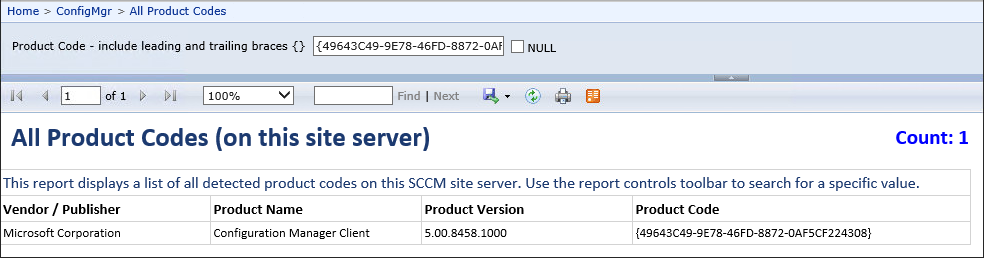
To bring this all together for the benefit of the end user (in my case, other IT colleagues), here is an example SSRS report structure. Include a single nullable text parameter called ProductCode to restrict the query in most cases. The user can run the report using NULL, and the query will return all the product codes from the site server — depending on the size of the site server, this could take several minutes!
In these screenshots, I provided a sample product code from the Microsoft Visual Studio 2015 Update 3 for Team Explorer as the parameter value: